Introducing Deplao
Deplao is a free, open-source desktop app for managing many Zalo, Facebook and Telegram accounts, with CRM, campaigns, workflows, AI and sales integrations.
Deplao is a desktop app that manages many Zalo (personal / Business), Facebook (Messenger), Telegram (personal account) and Telegram Bot accounts in one application. It brings together a CRM, messaging campaigns, workflow automation, an AI Assistant, POS / shipping / payment integrations and internal task management, so sales, customer-care and marketing teams can work from one place.
- A desktop app for Windows, macOS and Linux.
- Your data stays on your computer: messages, contacts, CRM data, photos and videos are stored locally.
- Open source under the MIT license, with every feature free to use.
The Deplao interface is in Vietnamese. Throughout these docs, menus and buttons are given in English, followed by the exact Vietnamese label the first time they appear, for example Settings → Accounts (Cài đặt → Tài khoản).
What's in Deplao?
At a glance, Deplao has five layers:
- Operations hub: many Zalo, Facebook and Telegram accounts, a unified inbox, quick replies and chat-history sync.
- Customer management: CRM, labels, interaction history and messaging campaigns.
- Automation: workflows, AI, and triggers and actions that run in the background.
- Business connections: POS, shipping, payments, the Public API, webhooks and apps you build yourself.
- Internal management: reports, ERP, permissions, employee workspaces and cloud backup.
Who is it for?
- Small and medium businesses (SMEs): several employees work through the inboxes of many Zalo, Facebook and Telegram accounts; assign accounts to each person and track performance in reports.
- Marketing agencies / freelance marketers: manage many clients' accounts (kept apart with workspaces), run messaging campaigns, scan group members to find new customers and nurture leads automatically.
- Online shops / e-commerce: close orders and look after customers on Zalo, Facebook and Telegram; look up and create POS orders while chatting, and connect GHN and GHTK shipping and SePay and Casso payments.
- Sales & telesales: track customers with labels, internal notes and appointments; filter and sort by most recent message; use workflows to send follow-ups automatically.
- Training centers / education: send class schedules, remind students and keep parents informed in bulk; group people by class or course with labels.
- Clinics / spas / beauty: send appointment reminders and post-service care with workflows; filter customers whose birthday is today or this week in the CRM to send greetings and bring them back.
- F&B / restaurants / cafés: send seasonal offers and group loyal customers with labels; take table bookings by message and confirm automatically when the customer pays by bank transfer (SePay, Casso).
- Multi-person sales teams: the Boss creates employee accounts, assigns each chat account and grants module-level permissions; employees connect over LAN or the Internet, and the Boss tracks each person's performance.
- Agents / distributors: send price lists and new products to your dealer network with campaigns or workflows; group dealers by region with labels.
- Content creators / KOCs / KOLs: gather follower messages in one place, let AI answer common questions 24/7 and turn followers into buyers.
- Engineering / system-integration teams: connect Zalo, Facebook and Telegram to your website, n8n or in-house software through the Public API, webhooks or your own apps running inside Deplao.
Key features
| Feature | What it does |
|---|---|
| Multi-account, multi-channel | Zalo, Facebook, Telegram, Telegram Bot - unlimited accounts |
| Unified inbox | Conversations from many accounts in a single list |
| Old message sync | Zalo from your phone, Facebook Messenger by date range |
| CRM & campaigns | Contacts, labels, notes, group-member scanning, bulk messaging |
| Workflow automation | Drag and drop or ask the AI copilot; test safely in Simulation mode |
| AI Assistant | Reply suggestions, Q&A inside the chat, 24/7 customer replies |
| Sales integrations | POS, shipping, payments, Google Sheets, email, HTTP… |
| Apps & Public API | Nearly 300 API operations, webhooks, apps you build yourself |
| Internet & Cloud | A fixed address through Cloudflare, backups to R2 / Google Drive |
| Reports & analytics | Messages, contacts, labels, employees, campaigns, workflows, AI |
| Task management (ERP) | Tasks, work calendar, internal notes |
| Boss ↔ employee workspaces | LAN / Internet connection, permissions, performance tracking |
| Light / dark theme | Switch from the top bar or Settings → Appearance (Cài đặt → Giao diện) |
| Per-account proxy | Pick a proxy right before signing in |
| Data stored on your computer | Messages, contacts, CRM, photos / videos stay on your machine |
Main areas of the app
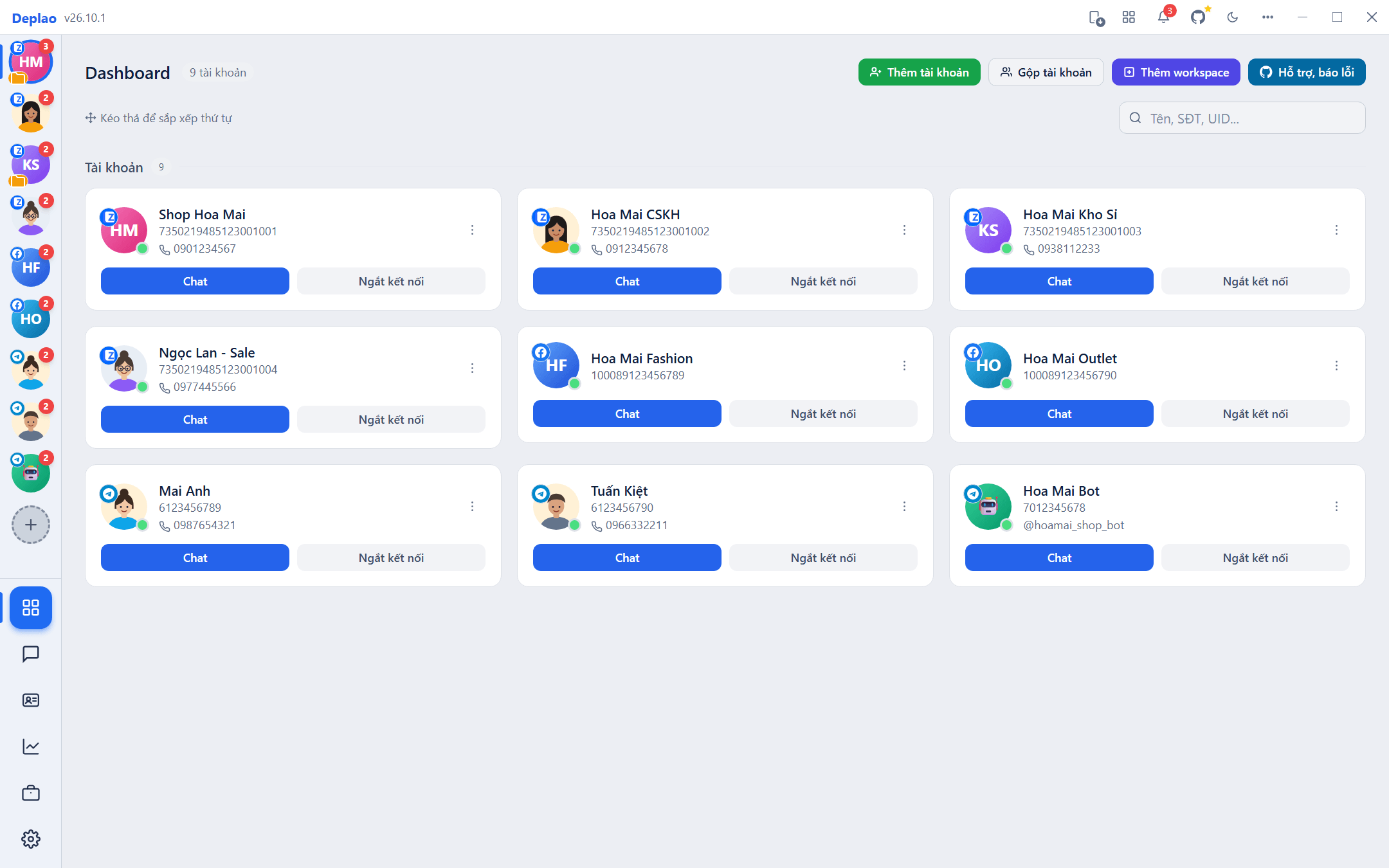
- Left sidebar: the avatars of your accounts (click one to switch, + to add another) and the Dashboard · Chat · CRM · Reports (Báo cáo) · Tools (Công cụ) · Settings (Cài đặt) sections.
- Tools (Công cụ): Workflow, Integrations (Tích hợp), Task management (Quản lý công việc, ERP) and Apps, API & Webhooks (Ứng dụng, API & Webhook).
- Top bar: the All features (Tất cả tính năng) button to find and open any page quickly (you can also show or hide each item on the sidebar), old-message sync for Zalo / Facebook, and the light / dark theme switch.
- Settings (Cài đặt): Conversations (Hội thoại), Appearance (Giao diện), Notifications (Thông báo), Accounts (Tài khoản), Proxy, Security (Bảo mật), Employees (Nhân viên), Workspace, Storage (Lưu trữ), Internet & Cloud (Internet & Đám mây), About (Giới thiệu), Version log (Log phiên bản), Logs (Nhật ký).
System requirements & operation
- Windows 10 / 11 (64-bit), macOS (Apple Silicon M1 or later, or Intel), Ubuntu / Linux (
.AppImageor.deb). - At least 4 GB of RAM (8 GB or more recommended), plenty of free disk space and a stable Internet connection.
- Keep the app running 24/7 if you use workflows or campaigns, or if employees connect to the Boss machine.
For downloading, installing, getting past the warnings when you open the installer, and updating, see Download & install.
Where to start?
- Download and install Deplao for your operating system.
- Add your accounts: Zalo, Facebook, Telegram or Telegram Bot.
- Get to know the Dashboard and the Chat inbox.
- When you're ready, expand into the CRM, workflows, the AI Assistant and employees.
Didn't find your answer?
Message us on Telegram